UX Case Study: Designing an equitable AI tool that runs locally for everyone
UX Case Study: Designing an equitable AI tool that runs locally for everyone
UX Case Study: Designing an equitable AI tool that runs locally for everyone
Aug 12, 2024
Aug 12, 2024
Introduction
Since the rise of AI tools, I’ve tried many cloud and local AI tools to support my daily life.
On the cloud side, Midjourney is my top choice of AI image generator, and ChatGPT is my favorite one on the text generation side.
I also tried with local AI model-running tools like Draw Things (a tool that supports a lot of image generate models), and LM Studio to generate texts.
Draw Things is great for generating images, It is kind of easy to install a model with one click (Civitai is my favorite repo), it lacks a chat UI, and it also requires some effort to import models and start generating your images.
LM Studio is more intuitive with chat UI, and you can install models with ease, but LM Studio does not support image-generating models. So my initial idea is to design a tool that supports both image and text generation.
Concept Overview
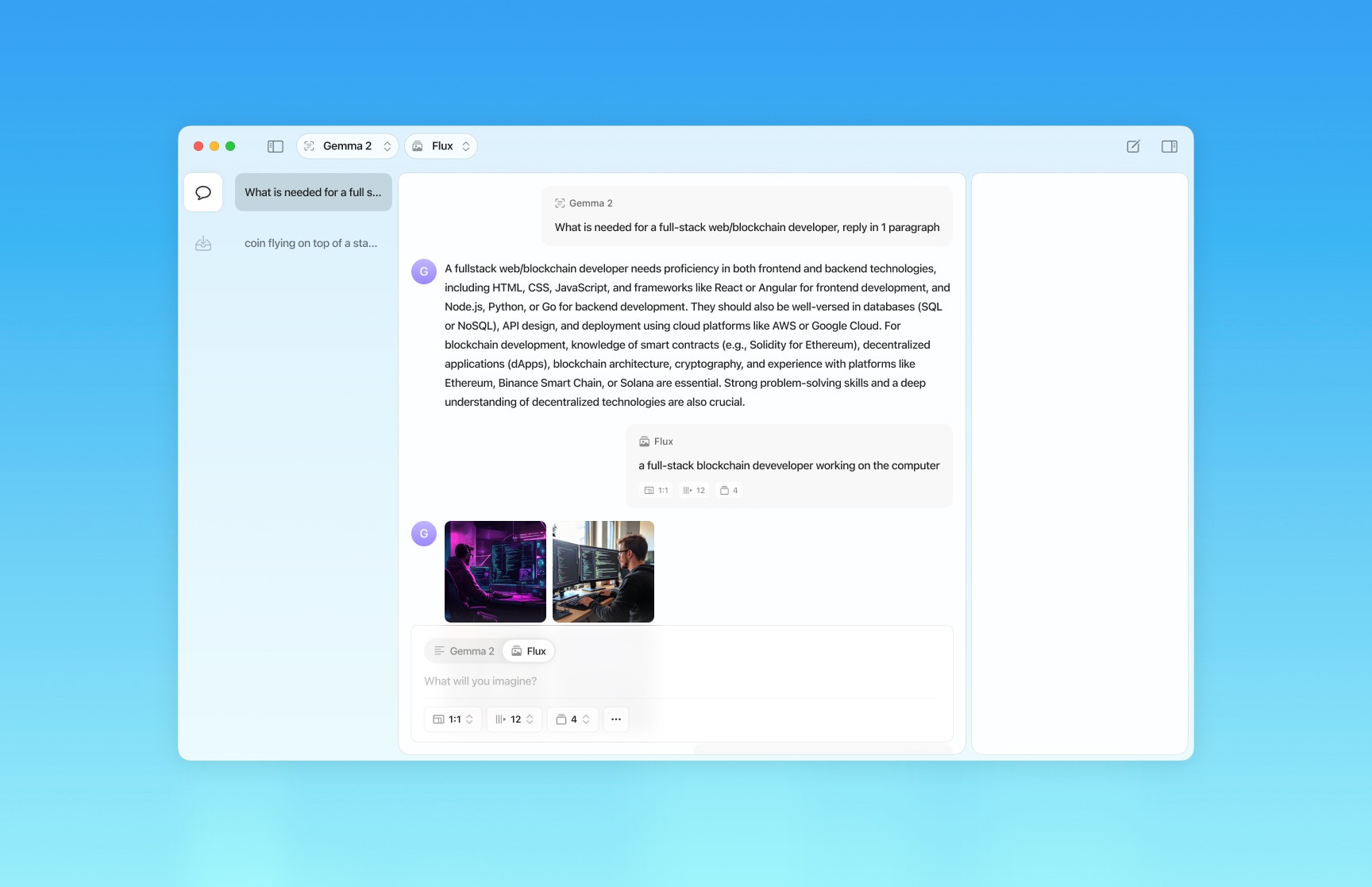
Ease AI aims to help any users with any tech background to start running their AI models in one single platform; they can generate texts and images in one chat by using different models for each task.
It is so much more convenient and cost-effective than using cloud AIs or separate local AI tools to generate text and images.
Vision and Goals
Ease AI empowers users to start their local AI models as quickly as possible and enhances the AI workflow on local machines more continuously and smoothly, here are the features to build.
Empowering users to generate text and images in one tool and one chat.
Build a store to download the AI model bundles, which include a text generate model and an image generate model in each bundle.
Onboarding processes reduce the effort from users regardless of their technology knowledge to start running the local AI models.
Provide a useable, enjoyable, equitable, and useful to all of the users.
Aim to support exclusive users by providing assistive technology.
Building network access/collaboration features to let users access other machines to perform AI tasks since they don’t have a powerful enough machine.
Empathizing Users
By conducting user research (internet & user interviews), and surveys to the groups of users such as writers, marketers, designers, and developers… in both levels of technology which are familiar and not familiar, I discovered the road rails that block potential users from adopting local AI tool:
Technical Challenges
Hard to Set up: Local AI tools often require users to have technical knowledge to install and configure the tool. Users need to download the models that are compatible with the tool and start setting up the models on the machine.
Machine Resource Requirements: Most of the image-generated models require a medium-up device to perform the AI tasks. Text generate models are less heavy, but it is still with low-spec devices.
Limited of Computing Power
Resource Constraints: Personal devices like Macs or PCs have less computing power than cloud-based AI tools’ servers. This restriction makes the thing of using cloud-based AI tools more attractive for tasks that require more computing resources.
Scaling: By using the local machine to run AI models, the computing power is limited to the user’s hardware which has limitations, on the cloud-based AI tools, it is adjustable to adjust the computing power based on the tasks and AI models.
Convenience and Accessibility
Ease of Use: Cloud-based AI tools offer friendly UI that makes it easy to use with most people, they can just create an account and start the generations without any additional installation or download.
Always Being Updated: Cloud-based AI tools often get updates on their server which does not require any action from the end users.
Accessibility: Cloud-based AI tools often provide assistive technology for exclusive user groups like people with vision problems with features such as text-2-speech or talk-2-AI.
Connectivity and Device Bound
The cloud-based requirements are no powerful devices to start using, all you need is a useable internet connection.
Build the User Personas
By understanding the groups of users, I sifted the user groups into three personas. The personas included the exclusive users from the products in the past.
Fiona
Background: A 25-year-old, working as a social media marketer for a fashion brand, she understands the potential of AI tools to enhance her marketing efforts, she also owns an entry-level laptop.
Goals: Fiona aims to enhance her work with AI tools to visualize and better tell her ideas.
Challenges: She has minimal technical knowledge, particularly regarding AI techs.
Motivation: Fiona is eager to leverage her AI to streamline her workflow but is being blocked by road rails from using local AI tools, so she is still relying on cloud AI tools.
Philip
Background: 35-year-old, graphic designer who has known computers and technology since he was 8. He has significant knowledge of technical, including AI technicals, and he knows how to install and run local AI tools.
Goals: He aims to enhance his design process by using AI tools to generate concepts and design materials. He also uses AI to troubleshoot problems while he’s working and generate the content for his works.
Challenges: He needs to switch the generate styles while creating concepts and design materials with local AI tools which require other AI models. Also, working with text generation, he has to install two local AI tools to work with images and text.
Motivation: Philip is excited about local AI tools to rely less on AI services and also take advantage of his powerful rig to reduce the cost of online services. Philip also wants to control the generations better than using online AI services.
Debbie
Background: 31-year-old Debbie is a full-time homemaker, she barely knows about technology and AI technologies by watching social networks, and she does not own a computer but an iPhone.
Goals: She usually uses online AI services for her daily life such as for cooking, learning, and researching…
Challenges: By owning no computer and lacking technology knowledge, Debbie doesn’t know how to set up and run a local AI tool.
Motivation: Debbie is looking for an AI tool that is budget-friendly and doesn’t require technology or knowledge to set up and start using. She also looking for a mobile-first solution.
Define
By analyzing the personas and user insights, I have defined the problems that block users from adopting local AI tools also the goals of the product design.
Problems
Technical Barriers: Users often lack the technology knowledge to set up and use local AI tools, so they go with cloud-based AI tools instead of local ones.
Resource: Many users might not afford the powerful enough or effort of the device.
User Experience: Current local AI tools usually lack friendly UI and streamlined processes to get users with varying technical backgrounds to onboard.
Goals
Onboarding with Ease: Provide a smooth and easy onboarding experience for every user whether they are good at tech or not.
Unified and Universal: Provide a unified platform for users to work with both text and image seamlessly, using various models as needed. Provide a cross-platform.
Model Store: Build a store where users can easily download pre-configured model bundles, a bundle including both text and image generation models. Users can customize the bundle and parameters after downloading the bundles as needed.
Assistive Features: Incorporate features that enhance accessibility for disabilities and are less familiar to technology users.
Onboarding Process
The onboarding process let users quickly install the AI models/bundle and jump on the generation tasks based on their needs with less efforts as possible.
Keep checking it, I’m still working on the writing and design ✍🏻Introduction
Since the rise of AI tools, I’ve tried many cloud and local AI tools to support my daily life.
On the cloud side, Midjourney is my top choice of AI image generator, and ChatGPT is my favorite one on the text generation side.
I also tried with local AI model-running tools like Draw Things (a tool that supports a lot of image generate models), and LM Studio to generate texts.
Draw Things is great for generating images, It is kind of easy to install a model with one click (Civitai is my favorite repo), it lacks a chat UI, and it also requires some effort to import models and start generating your images.
LM Studio is more intuitive with chat UI, and you can install models with ease, but LM Studio does not support image-generating models. So my initial idea is to design a tool that supports both image and text generation.
Concept Overview
Ease AI aims to help any users with any tech background to start running their AI models in one single platform; they can generate texts and images in one chat by using different models for each task.
It is so much more convenient and cost-effective than using cloud AIs or separate local AI tools to generate text and images.
Vision and Goals
Ease AI empowers users to start their local AI models as quickly as possible and enhances the AI workflow on local machines more continuously and smoothly, here are the features to build.
Empowering users to generate text and images in one tool and one chat.
Build a store to download the AI model bundles, which include a text generate model and an image generate model in each bundle.
Onboarding processes reduce the effort from users regardless of their technology knowledge to start running the local AI models.
Provide a useable, enjoyable, equitable, and useful to all of the users.
Aim to support exclusive users by providing assistive technology.
Building network access/collaboration features to let users access other machines to perform AI tasks since they don’t have a powerful enough machine.
Empathizing Users
By conducting user research (internet & user interviews), and surveys to the groups of users such as writers, marketers, designers, and developers… in both levels of technology which are familiar and not familiar, I discovered the road rails that block potential users from adopting local AI tool:
Technical Challenges
Hard to Set up: Local AI tools often require users to have technical knowledge to install and configure the tool. Users need to download the models that are compatible with the tool and start setting up the models on the machine.
Machine Resource Requirements: Most of the image-generated models require a medium-up device to perform the AI tasks. Text generate models are less heavy, but it is still with low-spec devices.
Limited of Computing Power
Resource Constraints: Personal devices like Macs or PCs have less computing power than cloud-based AI tools’ servers. This restriction makes the thing of using cloud-based AI tools more attractive for tasks that require more computing resources.
Scaling: By using the local machine to run AI models, the computing power is limited to the user’s hardware which has limitations, on the cloud-based AI tools, it is adjustable to adjust the computing power based on the tasks and AI models.
Convenience and Accessibility
Ease of Use: Cloud-based AI tools offer friendly UI that makes it easy to use with most people, they can just create an account and start the generations without any additional installation or download.
Always Being Updated: Cloud-based AI tools often get updates on their server which does not require any action from the end users.
Accessibility: Cloud-based AI tools often provide assistive technology for exclusive user groups like people with vision problems with features such as text-2-speech or talk-2-AI.
Connectivity and Device Bound
The cloud-based requirements are no powerful devices to start using, all you need is a useable internet connection.
Build the User Personas
By understanding the groups of users, I sifted the user groups into three personas. The personas included the exclusive users from the products in the past.
Fiona
Background: A 25-year-old, working as a social media marketer for a fashion brand, she understands the potential of AI tools to enhance her marketing efforts, she also owns an entry-level laptop.
Goals: Fiona aims to enhance her work with AI tools to visualize and better tell her ideas.
Challenges: She has minimal technical knowledge, particularly regarding AI techs.
Motivation: Fiona is eager to leverage her AI to streamline her workflow but is being blocked by road rails from using local AI tools, so she is still relying on cloud AI tools.
Philip
Background: 35-year-old, graphic designer who has known computers and technology since he was 8. He has significant knowledge of technical, including AI technicals, and he knows how to install and run local AI tools.
Goals: He aims to enhance his design process by using AI tools to generate concepts and design materials. He also uses AI to troubleshoot problems while he’s working and generate the content for his works.
Challenges: He needs to switch the generate styles while creating concepts and design materials with local AI tools which require other AI models. Also, working with text generation, he has to install two local AI tools to work with images and text.
Motivation: Philip is excited about local AI tools to rely less on AI services and also take advantage of his powerful rig to reduce the cost of online services. Philip also wants to control the generations better than using online AI services.
Debbie
Background: 31-year-old Debbie is a full-time homemaker, she barely knows about technology and AI technologies by watching social networks, and she does not own a computer but an iPhone.
Goals: She usually uses online AI services for her daily life such as for cooking, learning, and researching…
Challenges: By owning no computer and lacking technology knowledge, Debbie doesn’t know how to set up and run a local AI tool.
Motivation: Debbie is looking for an AI tool that is budget-friendly and doesn’t require technology or knowledge to set up and start using. She also looking for a mobile-first solution.
Define
By analyzing the personas and user insights, I have defined the problems that block users from adopting local AI tools also the goals of the product design.
Problems
Technical Barriers: Users often lack the technology knowledge to set up and use local AI tools, so they go with cloud-based AI tools instead of local ones.
Resource: Many users might not afford the powerful enough or effort of the device.
User Experience: Current local AI tools usually lack friendly UI and streamlined processes to get users with varying technical backgrounds to onboard.
Goals
Onboarding with Ease: Provide a smooth and easy onboarding experience for every user whether they are good at tech or not.
Unified and Universal: Provide a unified platform for users to work with both text and image seamlessly, using various models as needed. Provide a cross-platform.
Model Store: Build a store where users can easily download pre-configured model bundles, a bundle including both text and image generation models. Users can customize the bundle and parameters after downloading the bundles as needed.
Assistive Features: Incorporate features that enhance accessibility for disabilities and are less familiar to technology users.
Onboarding Process
The onboarding process let users quickly install the AI models/bundle and jump on the generation tasks based on their needs with less efforts as possible.
Keep checking it, I’m still working on the writing and design ✍🏻Introduction
Since the rise of AI tools, I’ve tried many cloud and local AI tools to support my daily life.
On the cloud side, Midjourney is my top choice of AI image generator, and ChatGPT is my favorite one on the text generation side.
I also tried with local AI model-running tools like Draw Things (a tool that supports a lot of image generate models), and LM Studio to generate texts.
Draw Things is great for generating images, It is kind of easy to install a model with one click (Civitai is my favorite repo), it lacks a chat UI, and it also requires some effort to import models and start generating your images.
LM Studio is more intuitive with chat UI, and you can install models with ease, but LM Studio does not support image-generating models. So my initial idea is to design a tool that supports both image and text generation.
Concept Overview
Ease AI aims to help any users with any tech background to start running their AI models in one single platform; they can generate texts and images in one chat by using different models for each task.
It is so much more convenient and cost-effective than using cloud AIs or separate local AI tools to generate text and images.
Vision and Goals
Ease AI empowers users to start their local AI models as quickly as possible and enhances the AI workflow on local machines more continuously and smoothly, here are the features to build.
Empowering users to generate text and images in one tool and one chat.
Build a store to download the AI model bundles, which include a text generate model and an image generate model in each bundle.
Onboarding processes reduce the effort from users regardless of their technology knowledge to start running the local AI models.
Provide a useable, enjoyable, equitable, and useful to all of the users.
Aim to support exclusive users by providing assistive technology.
Building network access/collaboration features to let users access other machines to perform AI tasks since they don’t have a powerful enough machine.
Empathizing Users
By conducting user research (internet & user interviews), and surveys to the groups of users such as writers, marketers, designers, and developers… in both levels of technology which are familiar and not familiar, I discovered the road rails that block potential users from adopting local AI tool:
Technical Challenges
Hard to Set up: Local AI tools often require users to have technical knowledge to install and configure the tool. Users need to download the models that are compatible with the tool and start setting up the models on the machine.
Machine Resource Requirements: Most of the image-generated models require a medium-up device to perform the AI tasks. Text generate models are less heavy, but it is still with low-spec devices.
Limited of Computing Power
Resource Constraints: Personal devices like Macs or PCs have less computing power than cloud-based AI tools’ servers. This restriction makes the thing of using cloud-based AI tools more attractive for tasks that require more computing resources.
Scaling: By using the local machine to run AI models, the computing power is limited to the user’s hardware which has limitations, on the cloud-based AI tools, it is adjustable to adjust the computing power based on the tasks and AI models.
Convenience and Accessibility
Ease of Use: Cloud-based AI tools offer friendly UI that makes it easy to use with most people, they can just create an account and start the generations without any additional installation or download.
Always Being Updated: Cloud-based AI tools often get updates on their server which does not require any action from the end users.
Accessibility: Cloud-based AI tools often provide assistive technology for exclusive user groups like people with vision problems with features such as text-2-speech or talk-2-AI.
Connectivity and Device Bound
The cloud-based requirements are no powerful devices to start using, all you need is a useable internet connection.
Build the User Personas
By understanding the groups of users, I sifted the user groups into three personas. The personas included the exclusive users from the products in the past.
Fiona
Background: A 25-year-old, working as a social media marketer for a fashion brand, she understands the potential of AI tools to enhance her marketing efforts, she also owns an entry-level laptop.
Goals: Fiona aims to enhance her work with AI tools to visualize and better tell her ideas.
Challenges: She has minimal technical knowledge, particularly regarding AI techs.
Motivation: Fiona is eager to leverage her AI to streamline her workflow but is being blocked by road rails from using local AI tools, so she is still relying on cloud AI tools.
Philip
Background: 35-year-old, graphic designer who has known computers and technology since he was 8. He has significant knowledge of technical, including AI technicals, and he knows how to install and run local AI tools.
Goals: He aims to enhance his design process by using AI tools to generate concepts and design materials. He also uses AI to troubleshoot problems while he’s working and generate the content for his works.
Challenges: He needs to switch the generate styles while creating concepts and design materials with local AI tools which require other AI models. Also, working with text generation, he has to install two local AI tools to work with images and text.
Motivation: Philip is excited about local AI tools to rely less on AI services and also take advantage of his powerful rig to reduce the cost of online services. Philip also wants to control the generations better than using online AI services.
Debbie
Background: 31-year-old Debbie is a full-time homemaker, she barely knows about technology and AI technologies by watching social networks, and she does not own a computer but an iPhone.
Goals: She usually uses online AI services for her daily life such as for cooking, learning, and researching…
Challenges: By owning no computer and lacking technology knowledge, Debbie doesn’t know how to set up and run a local AI tool.
Motivation: Debbie is looking for an AI tool that is budget-friendly and doesn’t require technology or knowledge to set up and start using. She also looking for a mobile-first solution.
Define
By analyzing the personas and user insights, I have defined the problems that block users from adopting local AI tools also the goals of the product design.
Problems
Technical Barriers: Users often lack the technology knowledge to set up and use local AI tools, so they go with cloud-based AI tools instead of local ones.
Resource: Many users might not afford the powerful enough or effort of the device.
User Experience: Current local AI tools usually lack friendly UI and streamlined processes to get users with varying technical backgrounds to onboard.
Goals
Onboarding with Ease: Provide a smooth and easy onboarding experience for every user whether they are good at tech or not.
Unified and Universal: Provide a unified platform for users to work with both text and image seamlessly, using various models as needed. Provide a cross-platform.
Model Store: Build a store where users can easily download pre-configured model bundles, a bundle including both text and image generation models. Users can customize the bundle and parameters after downloading the bundles as needed.
Assistive Features: Incorporate features that enhance accessibility for disabilities and are less familiar to technology users.
Onboarding Process
The onboarding process let users quickly install the AI models/bundle and jump on the generation tasks based on their needs with less efforts as possible.
Keep checking it, I’m still working on the writing and design ✍🏻